


 | Blog |
29 Jul 2026
Amazon Now Requires You to Tag AI-Generated People in Listing Images and A+ Content. Here Is Exactly How to Do It.
Amazon published a new mandatory requirement this week. If any of your listing images, hero shots, or A+ content features photorealistic AI-generated people, you must tag those files with specific metadata before uploading them to Seller Central – worldwide, across all stores.
This is not a future requirement. It is live now.
What Triggers the Requirement
The rule is narrow but important to understand precisely. It applies only to images and videos containing photorealistic AI-generated people — fully synthetic human figures that look real.
You do not need to tag the file if it:
- Features real people, even if AI tools were used to edit or enhance them
- Features fictional characters from movies, TV, games, or other expressive works
- Contains no people at all
- Contains people who are clearly not photorealistic
If your lifestyle shots, model images, or hero content use AI-generated humans that look like real people, the tag is required before the file goes anywhere near Seller Central.
Once Amazon detects the tag, an indicator is added to the listing informing customers that the image includes AI-generated people.
How to Add the Tag: Step-by-Step Instructions by Platform
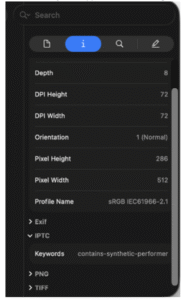
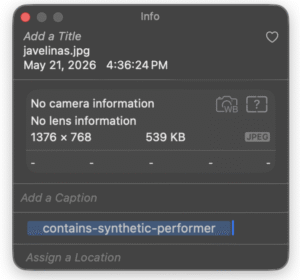
The tag itself is a single keyword — contains-synthetic-performer — added to the XMP dc:subject field of the image or video file. This happens at the file level, before upload. It cannot be added after a listing goes live.
On macOS — using Preview
- Open the file in Preview.
- Open the inspector with Cmd+I (or go to Tools > Show Inspector).
- Click the Keywords tab. It will show “No Keywords” initially.
- Click the + button at the bottom of the pane.
- Type contains-synthetic-performer and press Enter.
- The keyword now appears in the list. The file is ready to upload.



On Windows — using File Explorer
- Right-click the file and select Properties.
- Go to the Details tab.
- In the Description section, find the Tags field. Important: use only the Tags field, not the Subject field — they write to different metadata locations.
- Type contains-synthetic-performer into the Tags field.
- Leave the Subject field unchanged.
- Click OK.

On any system — using exiftool (command line)
For bulk workflows or non-Mac/Windows environments, exiftool handles this efficiently. First check the current state, then write the tag and verify:

The += operator appends to the keywords bag without overwriting existing keywords. Running the same command twice writes the keyword twice — this does not break the tag but bloats the XMP packet unnecessarily, so avoid duplicate runs.
Verify the Tag
After tagging, confirm the value is present by checking the XMP dc:subject field with any tool that can display explicit XMP metadata. On Mac, the Keywords tab in Preview should show the keyword. Via exiftool, the grep command above confirms it. Do not upload without verifying.
What This Means for Your Workflow
The most important operational detail: this is a file-level step that must happen before the file reaches Seller Central. It cannot be added retroactively to a live listing by editing the upload. It needs to be built into your creative process — either at the point of export from your design tool, or as a dedicated pre-upload step in your asset management workflow.
If your team produces AI-generated lifestyle or model imagery at volume, the exiftool command-line approach is the most practical path for bulk tagging. For individual images, the macOS or Windows methods are fast enough to handle on a per-file basis.
Check your existing image library today — any AI-generated model imagery already in use on listings or A+ content should be re-exported with the tag added, then re-uploaded. Better to catch it now than after a listing gets flagged.
The requirement comes from recent legislation on AI disclosure in advertising — New York’s synthetic performer law, which took effect June 9, 2026, is the US anchor, with EU AI Act requirements also in scope for European stores. Amazon is implementing the metadata standard globally, across all worldwide stores, rather than jurisdiction by jurisdiction.
One tag. One keyword. Added at the file level before upload. That is the entire compliance requirement.
Important note: This post shares publicly available information about Amazon’s new requirement and implementation steps. It does not constitute legal advice. Consult your legal counsel for questions specific to your situation.
If you want to stay updated on Amazon changes, subscribe to our blog.
If you need support with PPC, DSP, AMC, analytics, or a long-term growth strategy, contact the ANavigator team at info@anavigator.co
 Book a call to get a FREE AUDIT by the link below:

Book a call – FREE AUDIT
Follow my Weekly Newsletter on LinkedIn:
 / amazon-digest-for-brands-7232361008185372672
Follow me on LinkedIn:
/ ookovalov
Follow ANavigator on social media:
/ anavigator
 /@anavigator_official
 / anavigator7
 / @anavigators
LinkedIn page to contact us:

Author: Oleksandr Kovalov
Role: Founder & CEO @ ANavigator
— The ANavigator Team

Content is being updated


