Amazon Now Requires You to Tag AI-Generated People in Listing Images and A+ Content. Here Is Exactly How to Do It.

29 Jul 2026

Amazon Now Requires You to Tag AI-Generated People in Listing Images and A+ Content. Here Is Exactly How to Do It.

Amazon published a new mandatory requirement this week. If any of your listing images, hero shots, or A+ content features photorealistic AI-generated people, you must tag those files with specific metadata before uploading them to Seller Central – worldwide, across all stores.

This is not a future requirement. It is live now.

What Triggers the Requirement

The rule is narrow but important to understand precisely. It applies only to images and videos containing photorealistic AI-generated people — fully synthetic human figures that look real.

You do not need to tag the file if it:

  • Features real people, even if AI tools were used to edit or enhance them
  • Features fictional characters from movies, TV, games, or other expressive works
  • Contains no people at all
  • Contains people who are clearly not photorealistic

If your lifestyle shots, model images, or hero content use AI-generated humans that look like real people, the tag is required before the file goes anywhere near Seller Central.

Once Amazon detects the tag, an indicator is added to the listing informing customers that the image includes AI-generated people.

How to Add the Tag: Step-by-Step Instructions by Platform

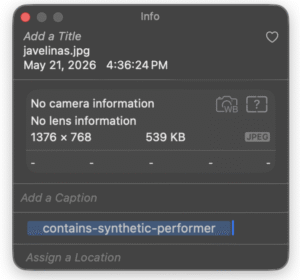
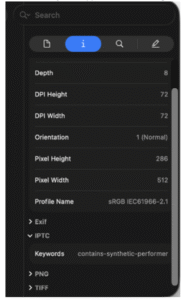
The tag itself is a single keyword — contains-synthetic-performer — added to the XMP dc:subject field of the image or video file. This happens at the file level, before upload. It cannot be added after a listing goes live.


On macOS — using Preview

  1. Open the file in Preview.
  2. Open the inspector with Cmd+I (or go to Tools > Show Inspector).
  3. Click the Keywords tab. It will show “No Keywords” initially.
  4. Click the + button at the bottom of the pane.
  5. Type contains-synthetic-performer and press Enter.
  6. The keyword now appears in the list. The file is ready to upload.



On Windows — using File Explorer

  1. Right-click the file and select Properties.
  2. Go to the Details tab.
  3. In the Description section, find the Tags field. Important: use only the Tags field, not the Subject field — they write to different metadata locations.
  4. Type contains-synthetic-performer into the Tags field.
  5. Leave the Subject field unchanged.
  6. Click OK.


On any system — using exiftool (command line)

For bulk workflows or non-Mac/Windows environments, exiftool handles this efficiently. First check the current state, then write the tag and verify:


The += operator appends to the keywords bag without overwriting existing keywords. Running the same command twice writes the keyword twice — this does not break the tag but bloats the XMP packet unnecessarily, so avoid duplicate runs.


Verify the Tag

After tagging, confirm the value is present by checking the XMP dc:subject field with any tool that can display explicit XMP metadata. On Mac, the Keywords tab in Preview should show the keyword. Via exiftool, the grep command above confirms it. Do not upload without verifying.

What This Means for Your Workflow

The most important operational detail: this is a file-level step that must happen before the file reaches Seller Central. It cannot be added retroactively to a live listing by editing the upload. It needs to be built into your creative process — either at the point of export from your design tool, or as a dedicated pre-upload step in your asset management workflow.

If your team produces AI-generated lifestyle or model imagery at volume, the exiftool command-line approach is the most practical path for bulk tagging. For individual images, the macOS or Windows methods are fast enough to handle on a per-file basis.

Check your existing image library today — any AI-generated model imagery already in use on listings or A+ content should be re-exported with the tag added, then re-uploaded. Better to catch it now than after a listing gets flagged.

The requirement comes from recent legislation on AI disclosure in advertising — New York’s synthetic performer law, which took effect June 9, 2026, is the US anchor, with EU AI Act requirements also in scope for European stores. Amazon is implementing the metadata standard globally, across all worldwide stores, rather than jurisdiction by jurisdiction.

One tag. One keyword. Added at the file level before upload. That is the entire compliance requirement.

Important note: This post shares publicly available information about Amazon’s new requirement and implementation steps. It does not constitute legal advice. Consult your legal counsel for questions specific to your situation.

If you want to stay updated on Amazon changes, subscribe to our blog.

If you need support with PPC, DSP, AMC, analytics, or a long-term growth strategy, contact the ANavigator team at info@anavigator.co

🚀 Book a call to get a FREE AUDIT by the link below: 🚀
⬇️ ⬇️ ⬇️
Book a call – FREE AUDIT


Follow my Weekly Newsletter on LinkedIn:
 / amazon-digest-for-brands-7232361008185372672  
Follow me on LinkedIn:
 / ookovalov 
Follow ANavigator on social media:
 / anavigator  
 /@anavigator_official
 / anavigator7  
 / @anavigators  


LinkedIn page to contact us:


Author: Oleksandr Kovalov
Role: Founder & CEO @ ANavigator
— The ANavigator Team

our activity

News and podcasts

SELECTED ARTICLE

Embracing Change and Innovation in Amazon E-commerce
blog
December 1, 2023
Embracing Change and Innovation in Amazon E-commerce

Amazon E-commerce Innovation: Embracing Change in a Dynamic Marketplace

The Amazon marketplace, known for its dynamic and ever-changing nature, presents a fascinating world of opportunities and challenges for sellers and brands. This platform, which started as a relatively open market, has evolved into a complex and competitive arena, demanding continuous adaptation and Amazon e-commerce innovation from its participants.

Since its early days as a burgeoning online marketplace, Amazon has transformed into a global e-commerce powerhouse, reshaping the way products are sold and marketed. Sellers now face an environment where standing out requires not only quality products but also strategic, data-driven approaches and a deep understanding of Amazon e-commerce innovation trends. Recognizing and adapting to these shifts is essential for anyone looking to carve out a successful niche in this competitive space.

Key Aspects of Amazon E-commerce Innovation

Amazon continues to drive innovation by introducing tools and programs that enable brands to optimize their presence and marketing efforts. From advanced PPC advertising options to the powerful DSP services Amazon offers, sellers have access to robust tools that enhance their visibility and help them reach their ideal customer base. This level of innovation requires sellers to constantly adapt their strategies, ensuring they make the most of these features to maximize their reach and profitability.

Moreover, Amazon’s emphasis on customer experience influences its evolving policies and standards, pushing sellers to keep up with quality, delivery, and product standards. This drive for innovation affects not only marketing approaches but also operational efficiency, requiring sellers to align their logistics and customer service with Amazon’s high standards. As the platform continues to evolve, sellers need to stay informed of the latest innovations in e-commerce to maintain a competitive edge.

Adapting to Change for Long-Term Success

Thriving in Amazon’s competitive landscape requires more than just an understanding of the basics. Successful sellers invest in learning about Amazon e-commerce innovation to make informed decisions and respond proactively to shifts in market trends and customer expectations. By embracing change, optimizing advertising strategies, and staying current with Amazon’s latest tools, sellers can ensure their businesses grow and succeed.

In the ever-evolving world of Amazon, adaptability and innovation are keys to long-term success. Those who actively embrace Amazon’s innovations and changes in the e-commerce landscape will find themselves well-positioned to thrive.

Learn more

LATEST UPDATES

Amazon Now Requires You to Tag AI-Generated People in Listing Images and A+ Content. Here Is Exactly How to Do It.
Blog
July 29, 2026
Amazon Now Requires You to Tag AI-Generated People in Listing Images and A+ Content. Here Is Exactly How to Do It.
Amazon published a new mandatory requirement this week. If any of your listing images, hero shots, or A+ content features photorealistic AI-generated people, you must tag those files with specific metadata before uploading them to Seller Central - worldwide, across all stores. This is not a future requirement. It is live now. What Triggers the Requirement The rule is narrow but important to understand precisely. It applies only to images and videos containing photorealistic AI-generated people — fully synthetic human figures that look real. You do not need to tag the file if it: Features real people, even if AI tools were used to edit or enhance them Features fictional characters from movies, TV, games, or other expressive works Contains no people at all Contains people who are clearly not photorealistic If your lifestyle shots, model images, or hero content use AI-generated humans that look like real people, the tag is required before the file goes anywhere near Seller Central. Once Amazon detects the tag, an indicator is added to the listing informing customers that the image includes AI-generated people. How to Add the Tag: Step-by-Step Instructions by Platform The tag itself is a single keyword — contains-synthetic-performer — added to the XMP dc:subject field of the image or video file. This happens at the file level, before upload. It cannot be added after a listing goes live. On macOS — using Preview Open the file in Preview. Open the inspector with Cmd+I (or go to Tools > Show Inspector). Click the Keywords tab. It will show "No Keywords" initially. Click the + button at the bottom of the pane. Type contains-synthetic-performer and press Enter. The keyword now appears in the list. The file is ready to upload.   On Windows — using File Explorer Right-click the file and select Properties. Go to the Details tab. In the Description section, find the Tags field. Important: use only the Tags field, not the Subject field — they write to different metadata locations. Type contains-synthetic-performer into the Tags field. Leave the Subject field unchanged. Click OK.   On any system — using exiftool (command line) For bulk workflows or non-Mac/Windows environments, exiftool handles this efficiently. First check the current state, then write the tag and verify: The += operator appends to the keywords bag without overwriting existing keywords. Running the same command twice writes the keyword twice — this does not break the tag but bloats the XMP packet unnecessarily, so avoid duplicate runs. Verify the Tag After tagging, confirm the value is present by checking the XMP dc:subject field with any tool that can display explicit XMP metadata. On Mac, the Keywords tab in Preview should show the keyword. Via exiftool, the grep command above confirms it. Do not upload without verifying. What This Means for Your Workflow The most important operational detail: this is a file-level step that must happen before the file reaches Seller Central. It cannot be added retroactively to a live listing by editing the upload. It needs to be built into your creative process — either at the point of export from your design tool, or as a dedicated pre-upload step in your asset management workflow. If your team produces AI-generated lifestyle or model imagery at volume, the exiftool command-line approach is the most practical path for bulk tagging. For individual images, the macOS or Windows methods are fast enough to handle on a per-file basis. Check your existing image library today — any AI-generated model imagery already in use on listings or A+ content should be re-exported with the tag added, then re-uploaded. Better to catch it now than after a listing gets flagged. The requirement comes from recent legislation on AI disclosure in advertising — New York's synthetic performer law, which took effect June 9, 2026, is the US anchor, with EU AI Act requirements also in scope for European stores. Amazon is implementing the metadata standard globally, across all worldwide stores, rather than jurisdiction by jurisdiction. One tag. One keyword. Added at the file level before upload. That is the entire compliance requirement. Important note: This post shares publicly available information about Amazon's new requirement and implementation steps. It does not constitute legal advice. Consult your legal counsel for questions specific to your situation. If you want to stay updated on Amazon changes, subscribe to our blog. If you need support with PPC, DSP, AMC, analytics, or a long-term growth strategy, contact the ANavigator team at info@anavigator.co  Book a call to get a FREE AUDIT by the link below:     Book a call – FREE AUDIT   Follow my Weekly Newsletter on LinkedIn:  / amazon-digest-for-brands-7232361008185372672   Follow me on LinkedIn:  / ookovalov  Follow ANavigator on social media:  / anavigator    /@anavigator_official  / anavigator7    / @anavigators     LinkedIn page to contact us:   Author: Oleksandr Kovalov Role: Founder & CEO @ ANavigator — The ANavigator Team
Learn more
ANavigator Weekly Amazon Digest — Week 30
Blog
July 27, 2026
ANavigator Weekly Amazon Digest — Week 30
This week's Amazon updates touch nearly every part of the ecosystem: PPC automation, DSP measurement, B2B growth, and voice shopping. The biggest story is Amazon quietly testing AI-driven targeting inside manual Sponsored Products campaigns, a signal of where PPC management is heading. Here's what changed and what it means for sellers and brands. 📌 Contents Amazon Tests AI-Powered Targeting Automation in Manual Sponsored Products Campaigns Amazon Rolls Out Ten New Features for Brand+ and Performance+ Amazon Adds Free Omnichannel Attribution to Advertising Console Amazon Business Hits $60 Billion in Sales Alexa+ Now Recommends and Sells Products in the UK Alexa Pulls YouTube Influencer Videos Into Shopping Conversations Amazon Tests Showing More Buying Choices Directly in Search Results   1. Amazon Tests AI-Powered Targeting Automation in Manual Sponsored Products Campaigns A new "Targeting strategy" beta lets AI add up to four new keywords or product targets to manual Sponsored Products campaigns every twelve to twenty-four hours, at or below your existing bids. It also auto-pauses targets using rules like no impressions in three days or twenty-plus clicks with no conversion in fourteen days. This is opt-in for now, but it expands the auctions Amazon can monetize and turns every participating campaign into training data. The likely path is that this becomes default, then merges with the ROAS-based bidding already in console. Sellers should test it on a smaller campaign first to understand the behavior before wider rollout. Read more here by Mansour Norouzi 2. Amazon Rolls Out Ten New Features for Brand+ and Performance+ As of July 20, Amazon began rolling out ten features across Brand+ and Performance+. Advertisers can now feed first-party audience data into Ads Data Manager as optimization input at no extra cost. Brand+ Audio is now fully available across sixteen countries, and Performance+ gets audio for the first time in beta. Brand+ STV line items can auto-select premium deals in the US, and AMG accounts get a new proposal builder. Worth reviewing which of these are already live on your account. Read more here by Oleksandr Kovalov 3. Amazon Adds Free Omnichannel Attribution to Advertising Console Amazon added a free measurement tool called OCM directly inside the Advertising Console, showing which specific retailers a brand's DSP campaigns drive sales at beyond Amazon. It blends first-party Shopper Panel data with third-party signals, using exposure-based attribution. This kind of cross-retailer visibility used to require custom MMM work costing hundreds of thousands of dollars. It's not a full MMM replacement, but it gives brands without that budget real evidence that upper-funnel Amazon media is working elsewhere. That's useful ammunition in budget conversations with finance. Read more here by Destaney Wishon 4. Amazon Business Hits $60 Billion in Sales Amazon Business, Amazon's B2B marketplace, has crossed sixty billion dollars in sales, up from thirty-five billion in 2022 and ten billion in 2018. Despite the scale, many sellers still don't know it exists. It runs on Amazon's existing infrastructure and catalog, layered with B2B features like payment terms, and now includes groceries. Amazon isn't chasing every corner of B2B trade, but so little of it happens online today that there's real room left to grow. Read more here by Juozas Kaziukėnas 5. Alexa+ Now Recommends and Sells Products in the UK Alexa+ has started surfacing full product recommendations in the UK, with reviews, pricing, and Add to Basket buttons pulled from a shopper's own order history. It's in early access now, ahead of a wider rollout across the Amazon app and browser. Early testing suggests Alexa is roughly twenty-seven percent more likely to make a personalized recommendation than Rufus is in the US. For brands selling into Europe, how you appear in these AI-generated recommendations is becoming a real variable to watch. Read more here by Nancy Morgan   6. Alexa Pulls YouTube Influencer Videos Into Shopping Conversations Amazon has started surfacing YouTube influencer content inside Alexa shopping conversations, triggered from a standard product page prompt. In one example involving the brand SALT & STONE, a normal chat prompt led into an Alexa conversation that included an influencer's YouTube video. This follows Amazon's continued push into video and is one of the clearest signs yet that influencer content could feed directly into Alexa's shopping experience. Read more here by Christian Rich 7. Amazon Tests Showing More Buying Choices Directly in Search Results Amazon is testing a search experience where shoppers can view reseller offers without opening the product detail page, using "More Buying Choices" beneath the Add to Cart button. This lets shoppers compare sellers, prices, delivery dates, and ratings straight from search. It gives resellers more visibility earlier in the buying journey and pushes price competition further upstream. Brands should treat this as a reason to audit pricing consistency across resellers now. Read more here by Will Haire That's a lot of Amazon news to track in one week. If you want these updates delivered every week without digging through LinkedIn yourself, subscribe to the ANavigator blog. We'll keep breaking down what changed and what it means for your account. If you want to stay updated on Amazon changes, subscribe to our blog. If you need support with PPC, DSP, AMC, analytics, or a long-term growth strategy, contact the ANavigator team at info@anavigator.co  Book a call to get a FREE AUDIT by the link below:     Book a call – FREE AUDIT   Follow my Weekly Newsletter on LinkedIn:  / amazon-digest-for-brands-7232361008185372672   Follow me on LinkedIn:  / ookovalov  Follow ANavigator on social media:  / anavigator    /@anavigator_official  / anavigator7    / @anavigators     LinkedIn page to contact us:   Author: Oleksandr Kovalov Role: Founder & CEO @ ANavigator — The ANavigator Team
Learn more